




What is phishing? A cyber security handbook for SMEs

Every day, UK businesses face phishing attacks that intend to steal data, drain bank accounts, and cripple operations. According to the UK Government’s Cyber Security Breaches Survey 2025, phishing remains the most common cyber threat – affecting 85% of all organisations that experienced a breach or attack.
For small and medium-sized businesses, the stakes are high. A successful phishing attack costs businesses an average of £1,600 per incident, rising to £3,550 when you exclude those who reported no losses. The damage reaches far beyond the immediate financial hit.
This guide explains what phishing is, how these scams work, the different types you need to watch for, and how to protect your business.
What is phishing?
Phishing is a social engineering attack where criminals send fraudulent messages to trick you into handing over sensitive information or clicking malicious links. Think emails, texts, phone calls, and social media messages.
The name is actually a play on the word ‘fishing’ as attackers cast out bait, hoping someone will bite.
Unlike technical cyberattacks that exploit software vulnerabilities, phishing exploits human psychology. Attackers manipulate urgency, fear, curiosity, or trust to pressure victims into acting without thinking.
What attackers are after:
- Login credentials (usernames and passwords)
- Financial information (bank details, credit card numbers)
- Sensitive business data (client lists, financial records)
- Access to your systems (to deploy ransomware or malware)
The National Cyber Security Centre (NCSC) emphasises that phishing attacks are getting harder to spot. Even observant, security-conscious employees can fall victim to sophisticated scams. Or someone might simply miss something they’d usually be aware of due to human error.
How do phishing scams work?
Most phishing attacks follow a predictable pattern. Attackers collect information about potential targets that they scrape from LinkedIn, purchase from data brokers, or steal in previous breaches. They identify which businesses use which platforms to make their scams more believable.
Then they create convincing messages meant to look like they come from trusted sources: your bank, HMRC, a supplier, or your own CEO. They’ll often use urgency messaging to make you act fast:
- Your account will be suspended
- Urgent payment require
- Verify your identity immediately
When victims take the bait, credentials entered on fake login pages go to the attacker/s. Malware downloads silently onto devices. Wire transfers send money to criminal accounts. Once attackers gain access to one account, they often use it to launch further attacks from that legitimate, trusted source.
An industry report by Zensec in 2025 saw a total of around 3.8 million phishing attacks.
What is a phishing email?
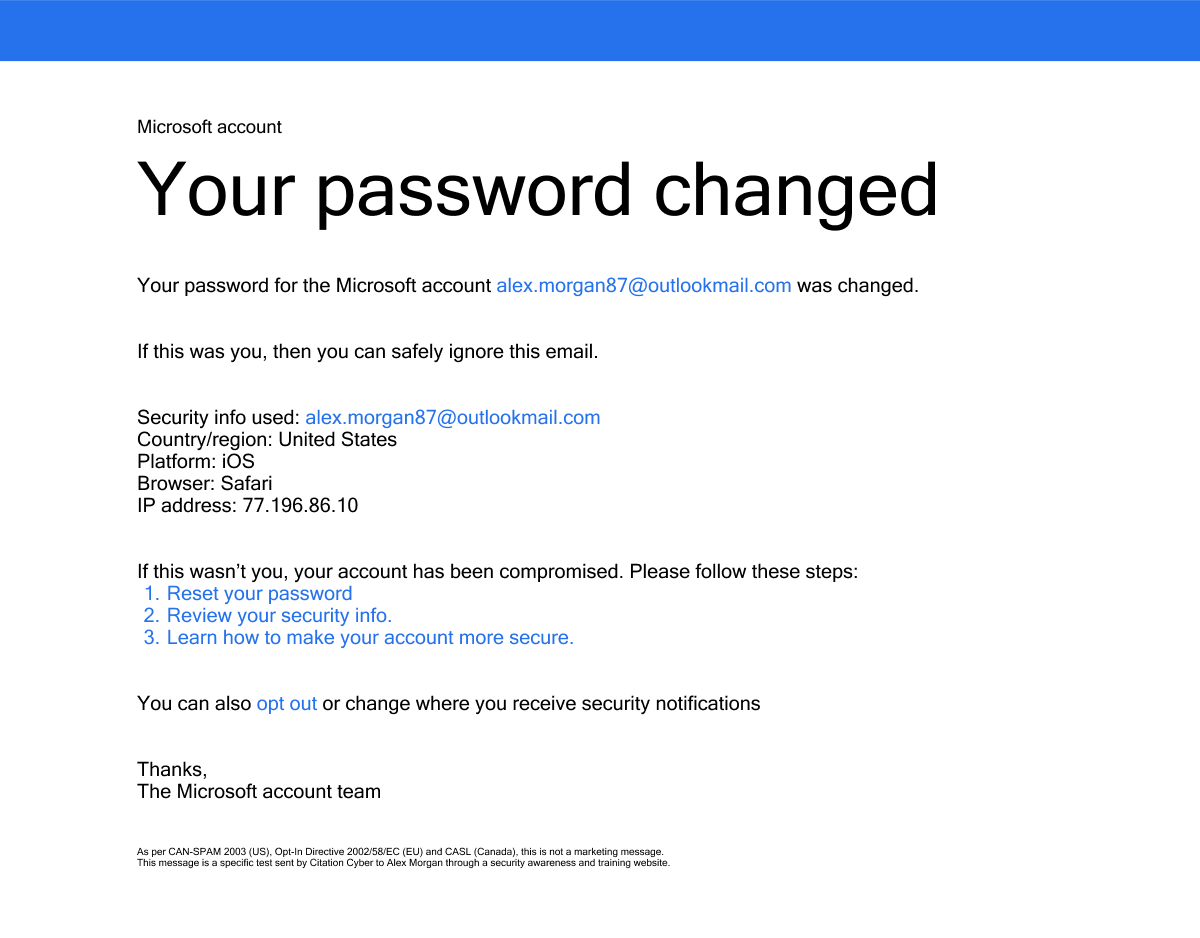
Phishing emails are fraudulent messages that are supposed to look like legitimate business communications.
Modern phishing isn’t anything like the previous, obviously fake scams. Attacks nowadays include legitimate-looking logos, professional language, realistic sender addresses, and personalised details about you or your business.
Red flags to look out for:
- Generic greetings – “Dear valued customer” instead of your name
- Urgent language – “Act within 24 hours or your account will be suspended”
- Suspicious sender addresses – Look closely: [email protected] uses a zero instead of ‘o’
- Unexpected attachments – Invoices you didn’t request, CVs when you’re not hiring
- Requests for sensitive information – Legitimate companies never ask for passwords via email
- Dodgy links – Hover without clicking. The displayed text may say “www.paypal.com” but actually points to www.paypa1.com
Types of phishing scams
What is spear phishing?
Spear phishing targets specific individuals or organisations rather than casting a wide net.
This means attackers research their victims – LinkedIn profiles, other social media accounts, and company websites. A spear phishing email might reference your recent promotion, a colleague by name, or industry-relevant concerns.
For example: You might get an email that looks like it’s from your IT department. It addresses you by name, talks about a recent system update that you actually heard about, and asks you to verify your credentials. Because the email looks genuine and seems urgent, you’re more likely to act.
What is whale phishing?
Whale phishing targets high-value individuals like CEOs, CFOs, and other C-suite executives.
They’re sophisticated attacks that exploit the authority and access senior leaders have. Attackers will spend weeks researching their target’s communication style, travel schedule, and business relationships to find out as much as possible and make the phish as realistic as possible.
For example: Your CEO receives an email that appears to be from the company’s solicitor, referencing a confidential matter, requesting urgent input on a “time-sensitive legal issue”. The link leads to a credential harvesting site. Or the CFO gets an email appearing to come from the CEO who’s travelling, requesting an urgent wire transfer.
Senior executives have access to the most sensitive data and authorisation for large financial transactions. Successfully phishing a whale gives attackers keys to the entire kingdom.
What is smishing?
Smishing is phishing that uses text messages (SMS) instead of emails.
For example: You get a text that claims to be from your bank, a delivery company, HMRC, or a parking company. The message has a link and seems urgent: “Parking Charge Notice: You have outstanding penalty charges for your vehicle. The payment deadline is 4 July.” or “ALERT: There’s unusual activity on your Barclays account. Verify immediately.”
If you think you need to pay something the same day or someone’s trying to take money from your account, you may click without taking a moment to think through the message. Especially when it’s a text and we often respond quicker than email. Mobile screens also make it harder to look at links properly.
What is pharming?
Pharming redirects users from legitimate websites to fraudulent ones without them knowing, even when they type the correct web address.
Attackers exploit vulnerabilities in DNS servers or compromise devices with malware. When you type “www.[Yourbank].co.uk” into your browser, you’re taken to a fake site that looks identical.
Unlike phishing, pharming doesn’t require victims to click on malicious links. The redirection happens invisibly and even cautious users who check URLs can be fooled.
What is quishing?
Quishing is a mix of QR codes and phishing, where someone uses a malicious QR code to trick you into visiting an unsafe website or downloading malware.
Attackers embed QR codes in emails, documents, and even real life. When scanned, these codes direct victims to phishing websites or trigger malware downloads. You might receive an email from “HR” about updating benefits with a QR code to “conveniently access the portal”, and scanning takes you to a fake login page.
QR codes can bypass traditional email filters and if you see one in real life, most people might not think twice about scanning.
What are the dangers of phishing?
Phishing impacts businesses in various ways, from financial to reputational.
Financial losses
According to IBM, the average cost of a breach in 2025 was $4.4 million. Business email compromise (BEC) attacks, where criminals impersonate executives to authorise fraudulent wire transfers, have cost businesses $3 billion globally in 2025, the FBI found.
While it’s easy to focus on the immediate financial impact, a lot of the costs come from what happens next. The reputational damage, business downtime, increased insurance, legal fees and regulatory fines all mount up. The economic impacts of cyber crime are drastic.
Loss of private data
Financial gain is a big motivator for cyberattacks, but another is personal data. Stolen data includes customer payment details, employee records, intellectual property, and financial forecasts. Under UK GDPR, data breaches must be reported to the ICO within 72 hours. Failure to adequately protect personal data can result in fines up to £17.5 million or 4% of annual global turnover – whichever is higher.
Attackers will also often use stolen data in other ways to gain access or money, or it’ll appear on the dark web, where it can be bought and sold repeatedly for years.
Losing customers
Customer trust can disappear quickly after a breach, especially if personal information is involved. The Hiscox Cyber Readiness Report found that nearly 50% of cyber attacked organisations reported difficulty attracting new customers, and 43% lost existing customers – a serious concern for everyone.
When customers discover their data has been compromised, many take their business elsewhere permanently. Replacing lost customers costs significantly more than retaining existing ones, straining marketing budgets under the pressure of reputation rehabilitation. And your competitors actively target your customers with messages emphasising their superior security.
Damage to reputation
News of security breaches spreads rapidly through social media, industry publications, and word-of-mouth. Business clients reassess risk. If they’re not sure about your security, they may exclude you from tenders, terminate contracts, or demand costly security certifications to prove you’ve improved.
Top talent hesitates to join organisations with publicised security problems. For mid-sized and larger businesses, breaches often attract negative media attention, amplifying reputational damage – just look at Jaguar Land Rover and Marks & Spencer.
Compliance fines
UK GDPR fines can reach £17.5 million or 4% of annual turnover – whichever’s higher. The ICO continues to demonstrate willingness to levy significant fines, British Airways received a £20 million fine for a 2018 data breach while Capita was fined £14 million in October 2025 following a phishing attack that compromised 6.6 million people’s data.
Financial services firms face FCA penalties. Businesses processing payments must comply with Payment Card Industry Data Security Standard. Non-compliance can result in fines from card networks, increased transaction fees, or loss of ability to accept card payments.
Disruption to workflow
Ransomware deployed via phishing can lock entire networks for days or weeks. Staff can’t access systems, complete transactions, or serve customers. Even a few hours of downtime translates to significant revenue loss.
IBM research shows that the average time to identify and contain a breach is 241 days globally, though organisations with extensive AI and automation reduced this by 80 days.
How to avoid phishing attempts
Avoiding phishing attempts completely is the best way for businesses to stay safe. But how exactly can you do that?
Train staff on how to identify phishing attempts
When it comes to phishing, your employees can either be your biggest risk, or your first line of defence. The big difference in which yours end up being is how you train them. And while training might not make sure they spot every phishing attempt, it helps raise awareness and create a more security-conscious culture. Regular, engaging sessions work better than annual lengthy training days.
Effective training includes:
- Understanding attack and phishing types
- How to spot red flags
- Who’s a target for attacks
- Clear reporting procedures
Employee awareness training provides comprehensive, engaging training that builds genuine security awareness across your organisation.
Deploy anti-phishing penetration testing
Awareness training is the first step to protecting you from phishing attacks, but you then need to verify that they can actually spot phishing attacks in practice.
Professional phishing simulations test whether your staff can apply what they’ve learned. These controlled attacks mimic real-world phishing campaigns – realistic emails, convincing sender addresses, legitimate-looking websites – without the actual risk.
Simulations help you identify:
- Which types of attack are most effective
- Who needs extra support or training
- New threats, so your team are one step ahead
Configure employee account privileges
You should always use least privilege access – which basically means only let people access the minimum required for their roles. A marketing coordinator doesn’t need access to financial systems and the warehouse team doesn’t need access to customer databases.
Deploy multi-factor authentication (MFA) across all business systems, including email, cloud, financial systems, and CRM tools. That means even if an attacker accesses passwords through phishing, MFA is a crucial second barrier.
Report all phishing attempts
Reporting phishing attempts internally protects your organisation. Make sure your team knows how and where to report any suspicious activity or phishing attempts.
Reporting phishing attempts externally helps defend businesses across the UK. The NCSC uses public reports to find trends, take down phishing infrastructure, and warn others about emerging threats. Over 50 million phishing attempts have been reported to the NCSC since 2020, and your team can report any scams to them.
Additional protective measures
Some extra measures to use include advanced email filtering with AI-powered analysis of sender reputation, content, and links. Modern solutions sandbox suspicious attachments before delivery and enforce DMARC, DKIM, and SPF authentication to prevent domain spoofing.
Install comprehensive security software on all devices, including anti-phishing capabilities, ransomware protection, and behavioural analysis.
Achieve the UK Government-backed Cyber Essentials standard, which requires implementing five critical controls proven to prevent around 80% of the majority of cyberattacks.
Final word on phishing attacks
Most phishing attacks succeed because of basic security gaps – weak passwords, no or little MFA, untrained employees, and poor email fundamentals. If you fix the basics, you can dramatically reduce your risk.
Always remember to combine technology with people. The best email filters catch most phishing attempts, but some will always slip through. Well-trained staff provide that critical last line of defence – your human firewall.
H3: Strengthen your defences with Citation Cyber
Citation Cyber helps UK businesses build comprehensive anti-phishing defences through realistic Phishing Simulations and Cyber Essentials Certification, covering the five critical controls that prevent most attacks.
Contact Citation Cyber today to assess your current vulnerability and build defences that actually work.